Read our blogs, tips and tutorials
Try our exercises or test your skills
Watch our tutorial videos
Catch up on one of our webinars
Take a self-paced course
Read our recent newsletters
License our courseware
Book expert consultancy
Buy our publications
Get help in using our site
401 attributed reviews in the last 3 years
Refreshingly small course sizes
Outstandingly good courseware
Whizzy online classrooms
Wise Owl trainers only (no freelancers)
Almost no cancellations
We have genuine integrity
We invoice after training
Review 30+ years of Wise Owl
View our top 100 clients
Search our website
We also send out useful tips in a monthly email newsletter ...

All UK prices exclude VAT
Topics marked will be covered if time allows.
Here are some reasons to choose Wise Owl courses:
In addition, here are some benefits unique to classroom training:
And some benefits specific to online training:
We've been in business over 30 years - we must be doing something right!
The table below lists the Using Power Query within Excel courses that we currently have scheduled (click on one of the tabs to filter the list).
If you can't see the course you want listed, don't despair! If you can muster 3 or 4 people together, it may well be worth organising an onsite course at your office (we'll provide and set up the computers), or else an online course tailored to your needs.
| Date(s) | Venue | Price | |
|---|---|---|---|
| 10 Sep | Online | £595.00 + VAT | Book |
| 12 Oct | Online | £595.00 + VAT | Book |
| 13 Nov | Online | £595.00 + VAT | Book |
| 11 Dec | Online | £595.00 + VAT | Book |
Other relevant pages
You can also book hourly online consultancy for your time zone with one of our 7 expert trainers!
We don't currently have any Power Query For Excel courses scheduled in our London training centre. We may consider adding dates - it's always worth asking.
Alternatively, if you have a handful of like-minded people in your organisation, you could consider booking your own bespoke Power Query For Excel course, whereby you get to pick the dates, training delivery method and venue!
Other relevant pages
You can also book hourly online consultancy for your time zone with one of our 7 expert trainers!
We don't currently have any Power Query For Excel courses scheduled in our Manchester training centre. We may consider adding dates - it's always worth asking.
Alternatively, if you have a handful of like-minded people in your organisation, you could consider booking your own bespoke Power Query For Excel course, whereby you get to pick the dates, training delivery method and venue!
Other relevant pages
You can also book hourly online consultancy for your time zone with one of our 7 expert trainers!
If you can't see the course you want listed, don't despair! If you can muster 3 or 4 people together, it may well be worth organising an onsite course at your office (we'll provide and set up the computers), or else an online course tailored to your needs.
| Date(s) | Venue | Price | |
|---|---|---|---|
| 10 Sep | Online | £595.00 + VAT | Book |
| 12 Oct | Online | £595.00 + VAT | Book |
| 13 Nov | Online | £595.00 + VAT | Book |
| 11 Dec | Online | £595.00 + VAT | Book |
Other relevant pages
You can also book hourly online consultancy for your time zone with one of our 7 expert trainers!
About half of our courses are created bespoke for a single organisation, and either delivered onsite (usually somewhere in the UK, but we're willing to travel!) or online. For onsite courses we will usually provide and set up the necessary computers free of charge.
There are four main reasons why you might want to book tailored training like this:
If you'd like a quote for how much a tailored course would cost please let us know what you'd like to achieve and we'll get back to you (normally within half a working day).
Here are some comments we've received about our Excel training . You can see all of our 401 reviews here. We would like to sincerely thank the clients whose names are shown below for kindly agreeing to let us share their feedback.
"I am absolutely thrilled to share my experience following the recent advanced Excel training session conducted for our team. From start to finish our trainer's expertise and teaching style exceeded all our expectations. His deep knowledge of Excel is truly impressive as is his ability to convey complex concepts in an understandable and engaging manner, which made the training not only informative but also enjoyable. He demonstrated a remarkable talent for breaking down intricate functions and formulas, ensuring that everyone, regardless of their starting skill level, could grasp the material confidently. The practical examples and hands-on exercises provided were incredibly helpful, allowing us to immediately apply what we learned to real-world scenarios. This training has undoubtedly equipped us with valuable skills and new insights that will significantly enhance our productivity and efficiency. Thank you for this amazing training session! It has truly been valuable!"
Sefton Gaade-Browne
PwC
"I really enjoyed my Excel course. The fact that the course was interactive and we followed along made it a lot more engaging than just being spoken to. Highly recommend!"
Laura Gallimore
Mitsubishi Electric UK
"The course content was really relevant for me to put into practise through spreadsheets I already have. The course trainer explained thoroughly, was patient and helpful throughout, felt very at ease asking questions when I was unsure."
Tara Boyle
Southend-on-Sea City Council
"Training was very interactive and this helped keep me engaged throughout both days - the course was quite a long one to do over teams but it didn't feel like it."
Caitlin Irving
Sellafield Ltd
"Apart from really enjoying the course, I did gain a lot of insight into how I currently use Excel and how I should use it. The course exercises are good to practice on."
Mike Walsh
Hyde Central Services Ltd
"Our trainer was excellent at delivering the online course. He did a great job going through each stage and answering all our questions."
Omotayo Daramola
PwC
Click on one of the tabs below to see the given information about this Excel course.
If your job involves frequently importing data into Excel and you’re still stuck using old-fashioned copy and paste methods, this course is about to make your life much easier! You’ll learn how to use Power Query to connect to a range of different data sources including Excel workbooks, SQL Server databases, text files and websites:

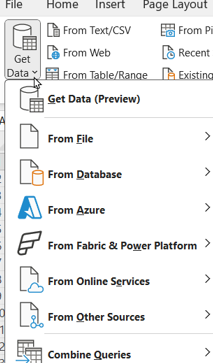
You'll learn how to extract, transform and load data using this Excel menu option.
We’ll also teach you how to use transforms in Power Query to tidy up messy data quickly and easily before it’s imported into your Excel worksheet.

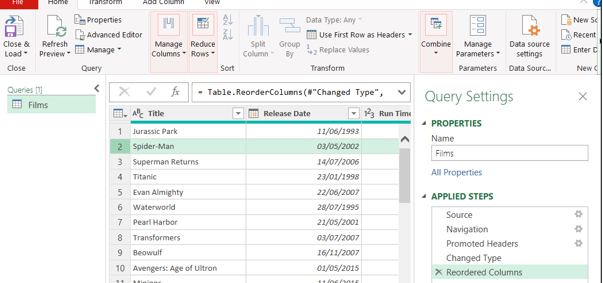
A sneak preview of Power Query.
If you’re fed up of manually deleting rows and columns, adding new calculated columns, merging lists and many other common tasks, this is the course for you!
In order to attend this course you must already know how to use Excel (you don't need to be a guru, but you should be comfortable entering formula).
If you book on a classroom course, the only thing you need to bring to the course is ... yourself! We even provide a notepad and a suprisingly nice pen for you to take notes with.
For online training you'll need two things:
You can see full details of our online course requirements here.
For classroom training, you won't need a computer - we (obviously) will provide that. However, you're welcome to use your own laptop if you prefer, providing that you have the correct software installed.
For online training you will need a computer, but you won't need to have any software installed. This is because you'll use Windows Remote Desktop to connect to our computers using our whizzy Wordsworth online training system, and these computers will have all of the necessary files and software installed.
If you book a place on one of our courses:
Whatever type of course you book, we will also send you out a reminder a few days before the course is due to take place - not that (we hope) you'll have forgotten!
After the course finishes you'll receive a digital certificate proving your attendance (we will gladly send a paper copy on request also).
We don't have any formal arrangement for answering questions after the course, but if you get stuck on something and email your trainer they should (and nearly always do!) respond as quickly as their training schedule allows.
Click on any heading below to learn more!
Here is a list of all of the Excel courses that we run:
| Course name | Days |
|---|---|
| Excel Introduction | One day |
| Excel Intermediate | One day |
| Excel Advanced | 2 days |
| Power Query For Excel (this course) | One day |
| Excel Business Modelling | 2 days |
| Excel VBA macros | 2 days |
| Advanced VBA | 2 days |
| Fast track Excel VBA | 3 days |
| Bite-sized Excel Basic Formulae | One day |
| Bite-sized Formats / Validation | One day |
| Bite-sized Excel Tables | One day |
| Bite-sized Conditions using =IF | One day |
| Bite-sized Looking up data | One day |
| Bite-sized Excel Pivot Tables | One day |
| Bite-sized Get Data / Query Editor | One day |
| Bite-sized Excel Charts | One day |
You might like to consider invesigating these related courses:
| Related course | Days | Level |
|---|---|---|
| Introduction to Power BI | 2 days | Introduction |
| Excel Advanced | 2 days | Introduction |
We run our scheduled classroom training courses in the following venues:
| Venue | Details |
|---|---|
| Excel training in London | We run our courses in London from the LandMark offices in Bevis Marks, right in the middle of the City (and close to Liverpool Street mainline station). |
| Excel training in Manchester | We run our courses in Manchester from the Holiday Inn business centre, which is a few minutes' walk from Piccadilly station. |
Kingsmoor House
Railway Street
GLOSSOP
SK13 2AA
Elementa Workspace
6 Bevis Marks
LONDON
EC3A 7BA
c/o Holiday Inn
25 Aytoun Street
MANCHESTER
M1 3AE
© Wise Owl Business Solutions Ltd 2026. All Rights Reserved.