Read our blogs, tips and tutorials
Try our exercises or test your skills
Watch our tutorial videos
Catch up on one of our webinars
Take a self-paced course
Read our recent newsletters
License our courseware
Book expert consultancy
Buy our publications
Get help in using our site
388 attributed reviews in the last 3 years
Refreshingly small course sizes
Outstandingly good courseware
Whizzy online classrooms
Wise Owl trainers only (no freelancers)
Almost no cancellations
We have genuine integrity
We invoice after training
Review 30+ years of Wise Owl
View our top 100 clients
Search our website
We also send out useful tips in a monthly email newsletter ...

All UK prices exclude VAT
Topics marked will be covered if time allows.
PDF summary of this course (contents, dates and prices)
Here are some reasons to choose Wise Owl courses:
In addition, here are some benefits unique to classroom training:
And some benefits specific to online training:
We've been in business over 30 years - we must be doing something right!
The table below lists the Using Microsoft 365 apps courses that we currently have scheduled (click on one of the tabs to filter the list).
If you can't see the course you want listed, don't despair! If you can muster 3 or 4 people together, it may well be worth organising an onsite course at your office (we'll provide and set up the computers), or else an online course tailored to your needs.
| Date(s) | Venue | Price | |
|---|---|---|---|
| 02-03 Jul | Online | £875.00 + VAT | Book |
| 03-04 Aug | Online | £875.00 + VAT | Book |
| 02-03 Sep | Online | £875.00 + VAT | Book |
| 01-02 Oct | Online | £875.00 + VAT | Book |
| 02-03 Nov | Online | £875.00 + VAT | Book |
| 01-02 Dec | Online | £875.00 + VAT | Book |
Note that this is a new course, so not all the dates shown above are guaranteed to run (you can see more details here ).
We don't currently have any Using Microsoft 365 courses scheduled in our London training centre. We may consider adding dates - it's always worth asking.
Alternatively, if you have a handful of like-minded people in your organisation, you could consider booking your own bespoke Using Microsoft 365 course, whereby you get to pick the dates, training delivery method and venue!
We don't currently have any Using Microsoft 365 courses scheduled in our Manchester training centre. We may consider adding dates - it's always worth asking.
Alternatively, if you have a handful of like-minded people in your organisation, you could consider booking your own bespoke Using Microsoft 365 course, whereby you get to pick the dates, training delivery method and venue!
If you can't see the course you want listed, don't despair! If you can muster 3 or 4 people together, it may well be worth organising an onsite course at your office (we'll provide and set up the computers), or else an online course tailored to your needs.
| Date(s) | Venue | Price | |
|---|---|---|---|
| 02-03 Jul | Online | £875.00 + VAT | Book |
| 03-04 Aug | Online | £875.00 + VAT | Book |
| 02-03 Sep | Online | £875.00 + VAT | Book |
| 01-02 Oct | Online | £875.00 + VAT | Book |
| 02-03 Nov | Online | £875.00 + VAT | Book |
| 01-02 Dec | Online | £875.00 + VAT | Book |
Note that this is a new course, so not all the dates shown above are guaranteed to run (you can see more details here ).
About half of our courses are created bespoke for a single organisation, and either delivered onsite (usually somewhere in the UK, but we're willing to travel!) or online. For onsite courses we will usually provide and set up the necessary computers free of charge.
There are four main reasons why you might want to book tailored training like this:
If you'd like a quote for how much a tailored course would cost please let us know what you'd like to achieve and we'll get back to you (normally within half a working day).
Here are some comments we've received about our Microsoft 365 training . You can see all of our 388 reviews here. We would like to sincerely thank the clients whose names are shown below for kindly agreeing to let us share their feedback.
"I attended the Power Apps course and really enjoyed it. The trainer was highly attentive, very knowledgeable, and kept the sessions engaging and entertaining throughout. I left feeling confident and motivated to use what I learned."
Jeff Franklin
The London School of Economics and Political Science (LSE)
"Really well planned course - the use of virtual machines was excellent - not something I've ever experienced during an online training course and it felt very professional. The pre-course check the week before to iron out any technical issues, also meant that we didn't waste time troubleshooting on the day. A great trainer, very knowledgeable and kept the energy high each day which meant the sessions were easy to keep engaged with. I'm looking forward to using what I've learned and putting it into practice! Other members within our team had attended a previous session and described how useful it was."
Jamie-Leigh Edington
Sellafield Ltd
"A great tutor and his approachable manner meant the training session ran very well and was enjoyable. Having used PowerBI everyday I was concerned that I may not pick up much but I was pleasantly surprised to pick up a number of techniques that I will use going forward. Thanks."
Tom Miles
Renault Trucks UK & Ireland
"A fantastic teacher, and extremely helpful and concise at breaking down difficult concepts."
Alex Morris
Cardinal Newman College
"This course was excellent! I had zero knowledge of Power BI when I joined this course and now, I will be developing some really awesome reports that answers some of the most important questions in the organization. I'd like to thank the instructor for his great teaching style and funny humour! For anyone thinking of taking this course, I would highly recommend this as the team at Wise Owl are a great bunch! Thanks a lot, guys!"
Qasim Awan
Manchester University NHS Foundation Trust
"Brilliant course for a beginner, especially with the course manual provided - really useful when working on anything Power BI. Our trainer was absolutely brilliant with us all, judged the pace perfectly and was happy to go on small tangents when questions were asked. "
Mark Bird
The Phoenix Group
Click on one of the tabs below to see the given information about this Microsoft 365 course.
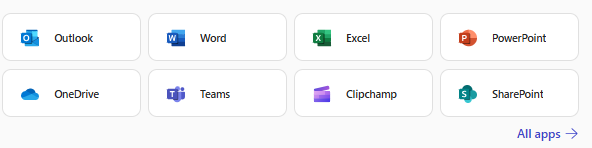
Microsoft 365 has a host of applications for you (and your company) to use:

A few of the many 365 apps.
This two-day course gives an overview of how to use the most important 365 apps, including sharing OneDrive files, collaborating in Word and Excel, creating meetings in Teams and sharing files using SharePoint.
There are no pre-requisites for attending this course, although it only makes sense to do so if your employer has a 365 licence!
If you book on a classroom course, the only thing you need to bring to the course is ... yourself! We even provide a notepad and a suprisingly nice pen for you to take notes with.
For online training you'll need two things:
You can see full details of our online course requirements here.
For classroom training, you won't need a computer - we (obviously) will provide that. However, you're welcome to use your own laptop if you prefer, providing that you have the correct software installed.
For online training you will need a computer, but you won't need to have any software installed. This is because you'll use Windows Remote Desktop to connect to our computers using our whizzy Wordsworth online training system, and these computers will have all of the necessary files and software installed.
If you book a place on one of our courses:
Whatever type of course you book, we will also send you out a reminder a few days before the course is due to take place - not that (we hope) you'll have forgotten!
After the course finishes you'll receive a digital certificate proving your attendance (we will gladly send a paper copy on request also).
We don't have any formal arrangement for answering questions after the course, but if you get stuck on something and email your trainer they should (and nearly always do!) respond as quickly as their training schedule allows.
Click on any heading below to learn more!
Here is a list of all of the Microsoft 365 courses that we run:
| Course name | Days |
|---|---|
| Using Microsoft 365 (this course) | 2 days |
| Introduction to Power Automate | 2 days |
| Advanced Power Automate | 2 days |
| Fast track Power Automate | 3 days |
| Power Apps | 2 days |
| Introduction to Office Scripts | 2 days |
| Advanced Office Scripts | 2 days |
You might like to consider invesigating these related courses:
| Related course | Days | Level |
|---|---|---|
| Introduction to Power Automate | 2 days | Introduction |
| Advanced Power Automate | 2 days | Introduction |
| Power Apps | 2 days | Introduction |
| Introduction to Office Scripts | 2 days | Introduction |
We run our scheduled classroom training courses in the following venues:
| Venue | Details |
|---|---|
| Microsoft 365 training in London | We run our courses in London from the LandMark offices in Bishopsgate, right in the middle of the City (and close to Liverpool Street mainline station). |
| Microsoft 365 training in Manchester | We run our courses in Manchester from the Holiday Inn business centre, which is a few minutes' walk from Piccadilly station. |
Kingsmoor House
Railway Street
GLOSSOP
SK13 2AA
Landmark Offices
99 Bishopsgate
LONDON
EC2M 3XD
Holiday Inn
25 Aytoun Street
MANCHESTER
M1 3AE
© Wise Owl Business Solutions Ltd 2026. All Rights Reserved.