Read our blogs, tips and tutorials
Try our exercises or test your skills
Watch our tutorial videos or shorts
Take a self-paced course
Read our recent newsletters
License our courseware
Book expert consultancy
Buy our publications
Get help in using our site
404 attributed reviews in the last 3 years
Refreshingly small course sizes
Outstandingly good courseware
Whizzy online classrooms
Wise Owl trainers only (no freelancers)
Almost no cancellations
We have genuine integrity
We invoice after training
Review 30+ years of Wise Owl
View our top 100 clients
Search our website
We also send out useful tips in a monthly email newsletter ...

Some other pages relevant to these blogs include:
You can also book hourly online consultancy for your time zone with one of our 7 expert trainers!
|
How does Snowflake compare to Microsoft's T-SQL for SQL Server? Part two of a five-part series of blogs |
|---|
|
All dialects of SQL are similar, you'd think, but the different ethos and editing environment of Snowflake versus SQL Server make the switch surprisingly difficult, as this blog explains. |
In this blog
Here are some of the main dialects of SQL:
Dialect | Use |
|---|---|
Transact SQL or T-SQL | Used within Microsoft's SQL Server and Azure |
Snowflake SQL | Used, not surprisingly, for interrogating Snowflake databases |
Postgres SQL | Used, equally unsurprisingly, for interrogating Postgres databases |
PL/SQL | Oracle's version of SQL |
MySQL | An open-source version of SQL |
ANSI SQL | The standard specification of SQL from which all of the dialects derive |
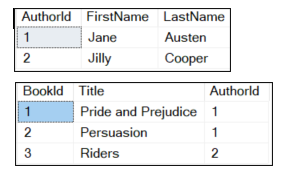
This page compares the first two dialects: Microsoft's T-SQL and Snowflake SQL. The examples are based on a (very) simple database containing two tables:

The first table contains authors, the second one books they've written (even though it's a tiny database, there's something for everyone to read).
The differences shown below aren't a complete list, but for day-to-day programmers writing SELECT statements they are the ones that people are by far the most likely to come across.
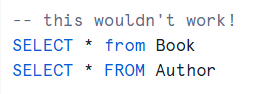
Although Microsoft have said that they may at some point enforce semi-colons at the end of commands, I've never used them. However, Snowflake does:

This gives a Snowflake compilation error, as the commands don't end in semi-colons.
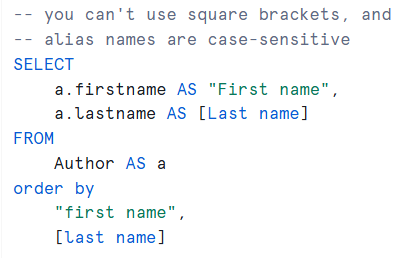
There are two big differences with Snowflake column aliases, as shown by this example:

This would fail for two reasons.
The differences are:
Difference | Notes |
|---|---|
You can't use square brackets | The reference to [Last name] above wouldn't compile |
Names in quotes are case-sensitive | The First name field is referenced in the ORDER BY clause as first name, which won't be found |
Compare this T-SQL query:
SELECT
-- join each author's first and last name
a.FirstName + ' ' + a.LastName AS Author,
b.Title
FROM
Author AS a
JOIN Book AS b ON a.AuthorId = b.BookId
With this Snowflake one:
SELECT
-- join each author's first and last name
a.FirstName || ' ' || a.LastName AS Author,
b.Title
FROM
Author AS a
JOIN Book AS b ON a.AuthorId = b.BookId
What this shows is that Snowflake uses || instead of + for string concatenation.
Here are some differences in the use of functions between the two SQL dialects:
Area | T-SQL example | Snowflake SQL |
|---|---|---|
Trapping nulls | IsNull( Title, 'No title given') | IsNull( Title, 'No title given') |
Getting today's date | GetDate() | Current_Date() |
Getting today's time | Current_Timestamp | Current_Timestamp() |
This is one of the biggest differences in syntax - T-SQL uses TOP 10, whereas Snowflake SQL uses LIMIT. Compare this Transact SQL query:
-- show the first 2 books
SELECT TOP 2
b.*
FROM
Book AS b
ORDER BY
b.Title
With its Snowflake equivalent:
SELECT
a.AuthorId, a.FirstName, a.LastName
FROM Author a
ORDER BY a.AuthorId
LIMIT 10;
Although there is a CAST function in Snowflake, it's more common to use the :: operator. For example:
-- cast BookId to NUMBER and Title to VARCHAR with a fixed length
SELECT
b.BookId::NUMBER(38,0),
b.Title::VARCHAR(100)
FROM Book AS b;
The case-sensitivity of T-SQL queries depends on the default database collation used. Snowflake makes things simpler by having two wildcard matching keywords, like and ilike. For example this query would return Riders, even though it doesn't start with an upper-case R:
SELECT
b.Title
FROM
Book AS b
where b.Title ilike 'r%';
| Parts of this blog |
|---|
Some other pages relevant to these blogs include:
You can also book hourly online consultancy for your time zone with one of our 7 expert trainers!
Kingsmoor House
Railway Street
GLOSSOP
SK13 2AA
Landmark Offices
99 Bishopsgate
LONDON
EC2M 3XD
Holiday Inn
25 Aytoun Street
MANCHESTER
M1 3AE
© Wise Owl Business Solutions Ltd 2026. All Rights Reserved.