The Wise Owl logo (an owl and the company name)

Our training courses

Other training resources

Our training venues

Why we are different

Bite-sized Getting Data / Query Editor Course (one day)

Random Wise Owl trainer headshot
Andrew (one of our 6 Wise Owl trainers)

Find the right course for you

All UK prices exclude VAT

113 Google
5-star reviews


400 attributed
reviews

Topics covered on this course

  • Importing data  

    Subtopics

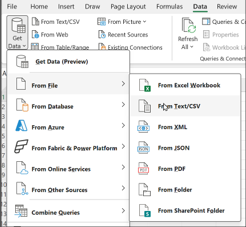
    1. Using different data sources
    2. Importing data
  • Transforming data  

    Subtopics

    1. Understanding query steps
    2. Creating basic transforms
    3. Using "column by example"
  • Specific transforms  

    Subtopics

    1. Splitting columns
    2. Pivoting and unpivoting

Topics marked will be covered if time allows.

PDF summary of this course (contents, dates and prices)

Why Choose Us?

Here are some reasons to choose Wise Owl courses:

In addition, here are some benefits unique to classroom training:

And some benefits specific to online training:

  • Courseware posted to you in advance
  • Separate pre-course check-up included
  • Our clever Wordsworth system means you can use our laptops (and we can see them)

We've been in business over 30 years - we must be doing something right!

Bite-sized Getting Data / Query Editor course dates

The table below lists the Bite-sized Getting Data / Query Editor courses that we currently have scheduled (click on one of the tabs to filter the list).

We don't currently have any Bite-sized Getting Data / Query Editor courses scheduled. We may consider adding dates - it's always worth asking.

Alternatively, if you have a handful of like-minded people in your organisation, you could consider booking your own bespoke Bite-sized Getting Data / Query Editor course, whereby you get to pick the dates, training delivery method and venue!

We don't currently have any Bite-sized Getting Data / Query Editor courses scheduled in our London training centre. We may consider adding dates - it's always worth asking.

Alternatively, if you have a handful of like-minded people in your organisation, you could consider booking your own bespoke Bite-sized Getting Data / Query Editor course, whereby you get to pick the dates, training delivery method and venue!

We don't currently have any Bite-sized Getting Data / Query Editor courses scheduled in our Manchester training centre. We may consider adding dates - it's always worth asking.

Alternatively, if you have a handful of like-minded people in your organisation, you could consider booking your own bespoke Bite-sized Getting Data / Query Editor course, whereby you get to pick the dates, training delivery method and venue!

We don't currently have any online Bite-sized Getting Data / Query Editor courses scheduled. We may consider adding dates - it's always worth asking.

Alternatively, if you have a handful of like-minded people in your organisation, you could consider booking your own bespoke Bite-sized Getting Data / Query Editor course, whereby you get to pick the dates, training delivery method and venue!

About half of our courses are created bespoke for a single organisation, and either delivered onsite (usually somewhere in the UK, but we're willing to travel!) or online. For onsite courses we will usually provide and set up the necessary computers free of charge.

There are four main reasons why you might want to book tailored training like this:

  1. If you have 3 or more people, organising custom training will probably be cheaper than booking people individually onto a scheduled course.
  2. You'll be able to choose the content of any training, and be able to pause it for discussions on how you'll use software internally, or ask to take digressions.
  3. You may not be able to travel to our venues, so it might be easier to ask us to travel to you.
  4. You may not be able to make the dates of our published scheduled courses, and want to be able to choose when your training takes place.

If you'd like a quote for how much a tailored course would cost please let us know what you'd like to achieve and we'll get back to you (normally within half a working day).

What other people have said about our Excel training

Here are some comments we've received about our Excel training . You can see all of our 400 reviews here. We would like to sincerely thank the clients whose names are shown below for kindly agreeing to let us share their feedback.

"The trainer taught this VBA course with enthusiasm and explained everything in detail and constantly offered help when needed. I feel confident in VBA after this training course."

Jessie Nelligan

Sellafield Ltd

"Fantastic trainer and delivered the course to a very high standard, I learnt a lot from the course which will make my role much easier and quicker."

Marie Lea

Hyde Central Services Ltd

"Our trainer was great. He made two days of excel fun and enjoyable (difficult task). Thank you so much! It was super helpful and will definitely improve my productivity going forwards."

Alice Foster

Ministry of Housing, Communities & Local Government (MHCLG)

"Our trainer was professional, knowledgeable and enthusiastic. The course was way better than I thought. The course covers from the most basic to advanced knowledge and I was provided with knowledge that I can use on a daily basis at work, which I think is totally worth it."

Kim Pham

Nationwide Building Society

"Our trainer was excellent at delivering the online course. He did a great job going through each stage and answering all our questions."

Omotayo Daramola

PwC

"Really enjoyed it."

Gary Woodcock

Wurth Elektronik

About this Bite-sized Getting Data / Query Editor course

Click on one of the tabs below to see the given information about this Excel course.

Overwrite this HTML

Pre-requisites

Overwrite this HTML

What you'll need to bring

If you book on a classroom course, the only thing you need to bring to the course is ... yourself! We even provide a notepad and a suprisingly nice pen for you to take notes with.

For online training you'll need two things:

  1. A good internet connection (otherwise you'll have a frustrating time); and
  2. A second screen (a requirement, not a nice-to-have!)

You can see full details of our online course requirements here.

For classroom training, you won't need a computer - we (obviously) will provide that. However, you're welcome to use your own laptop if you prefer, providing that you have the correct software installed.

For online training you will need a computer, but you won't need to have any software installed.  This is because you'll use Windows Remote Desktop to connect to our computers using our whizzy Wordsworth online training system, and these computers will have all of the necessary files and software installed.

When you book a place

If you book a place on one of our courses:

  • For classroom courses we will send out a joining email. That's it!
  • For online courses we will get in touch to organise a half-hour pre-course check to iron out any connection problems before the course (rather than during it). We will also ask you whether you want to receive a printed copy of the course manual (and post this to you if you do).

Whatever type of course you book, we will also send you out a reminder a few days before the course is due to take place - not that (we hope) you'll have forgotten!

After the course

After the course finishes you'll receive a digital certificate proving your attendance (we will gladly send a paper copy on request also).

We don't have any formal arrangement for answering questions after the course, but if you get stuck on something and email your trainer they should (and nearly always do!) respond as quickly as their training schedule allows.

FAQs (Frequently Asked Questions)

Click on any heading below to learn more!

Hidden
Hidden

What other Excel courses can I take?

Here is a list of all of the Excel courses that we run:

What courses do you have related to this one?

We don't have any courses listed of direct relevance to this one.

What are your venues for your classroom Excel courses?

We run our scheduled classroom training courses in the following venues:

Venue Details
Excel training in London We run our courses in London from the LandMark offices in Bevis Marks, right in the middle of the City (and close to Liverpool Street mainline station).
Excel training in Manchester We run our courses in Manchester from the Holiday Inn business centre, which is a few minutes' walk from Piccadilly station.
This page has 0 threads Add a new post

Head office

Kingsmoor House

Railway Street

GLOSSOP

SK13 2AA

London

Landmark Offices

6 Bevis Marks

LONDON

EC3A 7BA

Manchester

c/o Holiday Inn

25 Aytoun Street

MANCHESTER

M1 3AE

Google reviews star logo

© Wise Owl Business Solutions Ltd 2026. All Rights Reserved.

End of small page here