Read our blogs, tips and tutorials
Try our exercises or test your skills
Watch our tutorial videos
Catch up on one of our webinars
Take a self-paced course
Read our recent newsletters
License our courseware
Book expert consultancy
Buy our publications
Get help in using our site
353 attributed reviews in the last 3 years
Refreshingly small course sizes
Outstandingly good courseware
Whizzy online classrooms
Wise Owl trainers only (no freelancers)
Almost no cancellations
We have genuine integrity
We invoice after training
Review 30+ years of Wise Owl
View our top 100 clients
Search our website
We also send out useful tips in a monthly email newsletter ...

You can find other training resources for the subject of this exercise here:
You can also book hourly online consultancy for your time zone with one of our 7 expert trainers!
| Software ==> | Copilot Studio Agents (6 exercises) |
| Topic ==> | Topics (3 exercises) |
| Level ==> | Average difficulty |
| Subject ==> | Artificial Intelligence training |
This exercise is provided to allow potential course delegates to choose the correct Wise Owl Microsoft training course, and may not be reproduced in whole or in part in any format without the prior written consent of Wise Owl.
This exercise assumes that you live in post-apocalyptic times, in a world troubled by zombies. You have been asked by the military commander of Sector H to report any sightings (and when the military commander of sector H asks someone to do something, they do it).
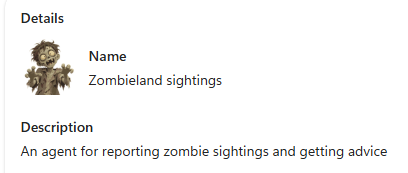
Begin by creating a(nother?) new agent to do with zombies:

You can - as ever - use the image in the folder above to get this icon, should you wish to.
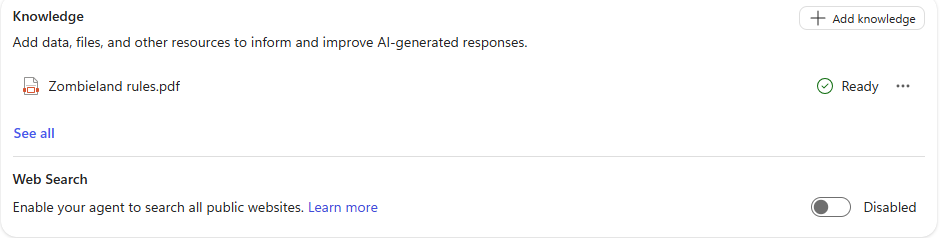
Add knowledge to your agent so that it can dispense advice using the 32 rules of the film Zombieland - and only these 32 rules:

Add the PDF file in folder at the start of this exercise to your agent's knowledge.
Start at the finish, in some ways. If someone says they want to report a zombie they'll need to provide 3 details:
Detail | Notes |
|---|---|
Their name | If the person doesn't give their name, we can't follow up on the sighting. |
Gender | To find a zombie it helps to know their gender, if known. |
Information | Other information (such as where the sighting took place, and what the zombie was doing). |
If the user doesn't provide these the agent will redirect them to a topic called Not enough details, which you should create:

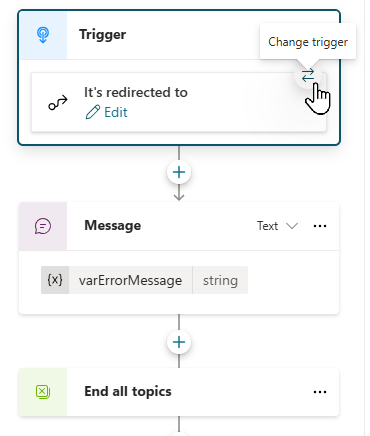
The topic should have an input called varErrorMessage, whose value it then displays in a message.
Don't forget to click on the icon shown in the diagram above to change the trigger so that the topic is only called when another topic redirects to it.
Now add a topic to your agent called Seen a Zombie:

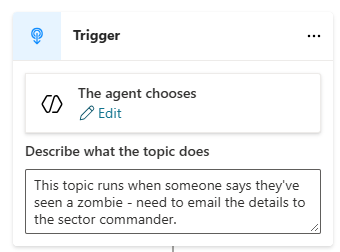
Your trigger description could look something like this.
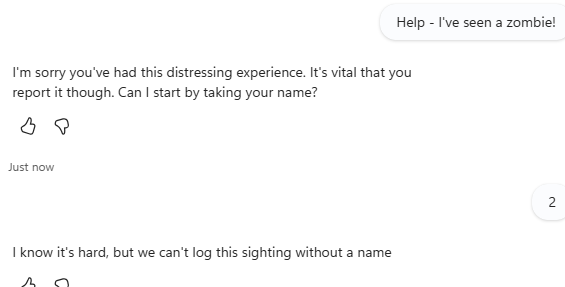
Add a Question node which asks someone for their name up to twice:

You should type in a customised retry prompt if the user doesn't answer the first time round.
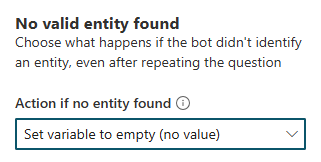
Configure the question so that it sets the variable to blank if no answer is given:

You'll find this on the Entity recognition tab of the question's properties.
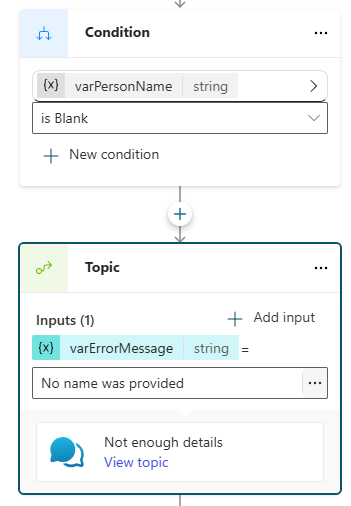
Add a condition to your topic which redirects the user to the Not enough details topic (passing in a suitable error message) if the user fails to provide a name:

Your condition should look something like this when you've finished it.
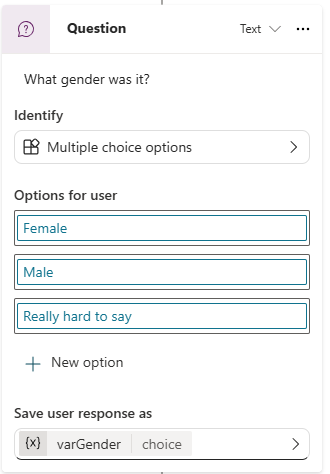
Add another question asking the user for the zombie's gender as a multiple choice question, and store the result in a variable called varGender:

Again, tell your topic to store a blank value if the user doesn't answer the question the second time round.
Add a condition (as for the name) to redirect the topic to the Not enough details topic - passing in a suitable error message - if the user doesn't choose a gender.
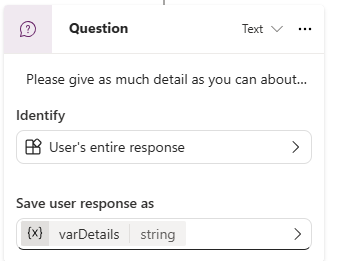
Add one final question asking for more details about the sighting:

Again, you should add a condition which tests whether any details have been entered, and redirects the topic to show a suitable error message if they haven't.
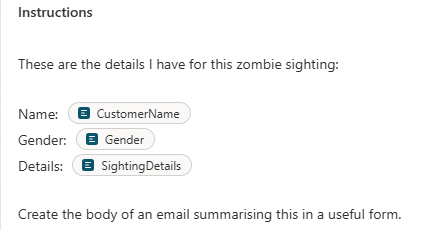
We now want to create the body of an email to go to the sector leader, so add this prompt node:

Add 3 bits of content to your prompt, and give them names as shown.
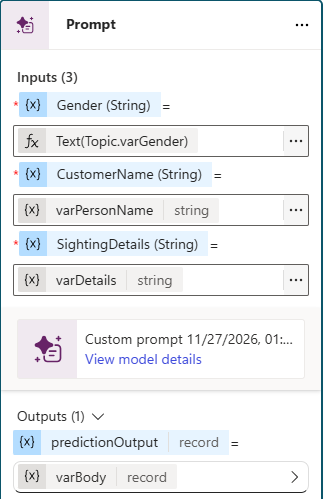
Configure your prompt to accept the customer name, zombie gender and sighting details, and create a variable called varBody:

Remember to convert the dropdown choice made to text before passing in to your Prompt node.
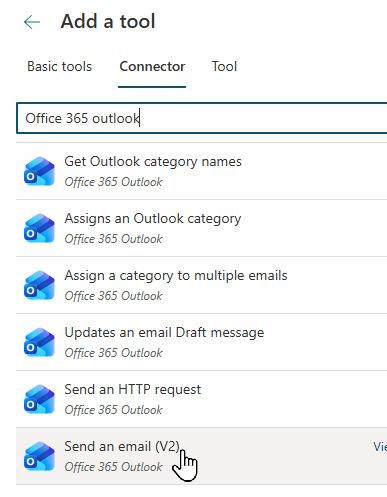
Save your topic (Wise Owl have found a bug in the next action), then add a tool to send an email about the sighting:

Choose this connector.
If your agent displays an error message at this point and hangs while trying to save the topic, try refreshing the page.
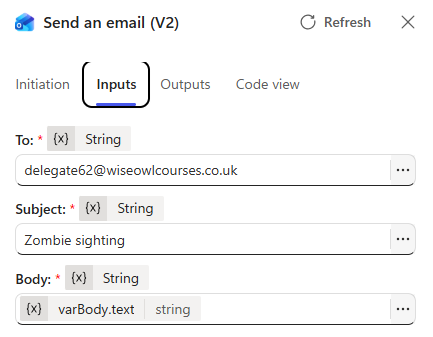
Fill in the To, Subject and Body inputs:

The sector leader turns out to be ... yourself.
Add an end all topics action to make sure that your agent doesn't loop, then save your topic agent and give it a whirl!
In the very unlikely event that you still have time and energy, here are some refinements you could add:
idea | Notes |
|---|---|
Adaptive card | Instead of relying on inputs for the person's name and gender, use an adaptive card with an input text box and input choice list. |
Escalation | If someone says they really need to talk directly to the sector leader, create a reassuringly soothing (but ultimately useless and annoying) fob-off message to show. |
Here's hoping the Internet is still running OK when the zombies attack ...
You can find other training resources for the subject of this exercise here:
You can also book hourly online consultancy for your time zone with one of our 7 expert trainers!
Kingsmoor House
Railway Street
GLOSSOP
SK13 2AA
Elementa Workspace
6 Bevis Marks
LONDON
EC3A 7BA
c/o Holiday Inn
25 Aytoun Street
MANCHESTER
M1 3AE
© Wise Owl Business Solutions Ltd 2026. Registered in England and Wales: company number 05110386.